

Analytics widget
Show each of your customers the clicks on their links, inside your product. Your server mints a
short-lived, tenant-scoped viewer token; your frontend renders <LinkAnalytics> (or iframes the
bundled widget) with it. No panel accounts for your customers, no sessions, no proxy routes
(ADR 0009).
sequenceDiagram
  participant B as Customer's browser
  participant H as Your app (session-guarded route)
  participant P as Links panel (/links)
  B->>H: GET /dashboard/links (your auth)
  H->>H: createViewerToken(secret, { tenant: org.id })
  H-->>B: page with token
  B->>P: GET /links/api/tenants/{org}/analytics<br/>Authorization: Bearer lvt_…
  P->>P: verify HMAC + expiry, force-scope to the token's tenant
  P-->>B: { totals, timeseries, breakdown }
1. Enable viewer tokens on the panel
Section titled “1. Enable viewer tokens on the panel”const panel = linksPanel({ storage, basePath: "/links", auth, // your admin auth, unchanged portal: { secret: process.env.LINKS_VIEWER_SECRET!, // any long random string allow: ["analytics:read", "link:read"], // optional; the default for tokens that name none },});With portal set, a request bearing Authorization: Bearer lvt_… is authenticated as a viewer
instead of going through your auth provider. The standalone server and the CLI enable it with
VIEWER_SECRET (Deployment).
2. Mint a token server-side
Section titled “2. Mint a token server-side”import { createViewerToken } from "@xtandard/links";
// In a route your own auth protects:app.get("/api/links-token", async (c) => { const org = await requireOrg(c); const token = await createViewerToken(process.env.LINKS_VIEWER_SECRET!, { tenant: org.id, // exactly one tenant links: undefined, // or ["lnk_…", …] to show only some links allow: undefined, // default: the panel's portal.allow, then analytics:read + link:read expiresIn: "1h", // default "1d" }); return c.json({ token });});The token is lvt_ + base64url({ tenant, links?, allow?, exp }) + . + an HMAC-SHA256
signature: stateless, verified with Web Crypto, nothing stored. Never mint tokens in the browser:
anyone holding the secret can mint a token for any tenant. Admins can also mint tokens over HTTP
with POST /api/tenants/:tenant/viewer-tokens (action viewer-token:create; a minter can only
delegate actions it holds itself), see HTTP API.
3. Render the widget
Section titled “3. Render the widget”import { LinkAnalytics } from "@xtandard/links/react";import "@xtandard/links/react/styles.css";
export function LinksAnalyticsPage({ token }: { token: string }) { return <LinkAnalytics apiBaseUrl="/links" token={token} theme="inherit" />;}<LinkAnalytics> sends the token as a Bearer credential on every request; /config then reports
viewer: true and the component renders the reduced widget chrome, pinned to the token’s tenant
(and links, when the token lists them). It takes the same props as <LinksDashboard>
(UI) except initialTenant:
| Prop | Default | Notes |
|---|---|---|
token |
required | the lvt_… viewer token |
apiBaseUrl |
"" |
where the panel is mounted ("/links", or another origin) |
theme |
"auto" |
"auto" (own switcher), "inherit" (follow the host page), "light", "dark" |
credentials |
"same-origin" |
fetch credentials mode |
fetch |
global fetch |
extra headers or instrumentation |
routing |
"hash" |
"hash", "browser", "memory" or a wouter location hook |
routerBase |
— | with routing: "browser" |
queryClient |
created | bring your own TanStack QueryClient |
className |
— | on the root wrapper |
logoUrl |
from /config |
navbar logo |
Styles are scoped under .xtandard-links, so they do not leak into your page. react and
react-dom (18 or 19) are optional peers of the package, needed only for this subpath.
Tokens expire: refetch one from your route before exp (or when a request answers 401 VIEWER_TOKEN) and re-render with the new token.
Without React
Section titled “Without React”The bundled SPA accepts the token in the URL fragment (or the query string) and renders the same widget chrome, so an iframe works anywhere:
<iframe src="/links/#token=lvt_…" style="width: 100%; height: 640px; border: 0"></iframe>The SPA removes the token from the address bar once it has read it. Prefer the fragment: it never
reaches your server or its access logs, where ?token= does. Keep expiresIn short either way.
Cross-origin
Section titled “Cross-origin”When the panel runs on another origin than your app, enable CORS on the panel (cors option,
Adapters) and point apiBaseUrl at it. Viewer tokens are bearer credentials, so no
cookies or credentials: "include" are needed.
What a viewer can do
Section titled “What a viewer can do”Viewer principals are force-scoped and closed: their tenant only, the listed link ids only
(when links is set), and only the actions in their allow list. Your authorization provider is
not consulted for them.
- Default actions:
analytics:readandlink:read. - Grantable on top (still confined to the tenant and link set):
tenant:read,domain:read,link:create,link:update,link:delete,link:import,customer:read,audit:read,conversion:track. Addlink:create/link:updateto let customers manage their own links through the same embed. - Never grantable: tenant and domain management, the global audit log, minting further tokens.
Details: Authorization.
Revocation
Section titled “Revocation”Tokens are stateless: there is no list to delete from. A token stops working when it expires or
when you rotate portal.secret (which invalidates every outstanding token). Keep lifetimes short
(minutes to hours) and mint on demand.
What the widget shows
Section titled “What the widget shows”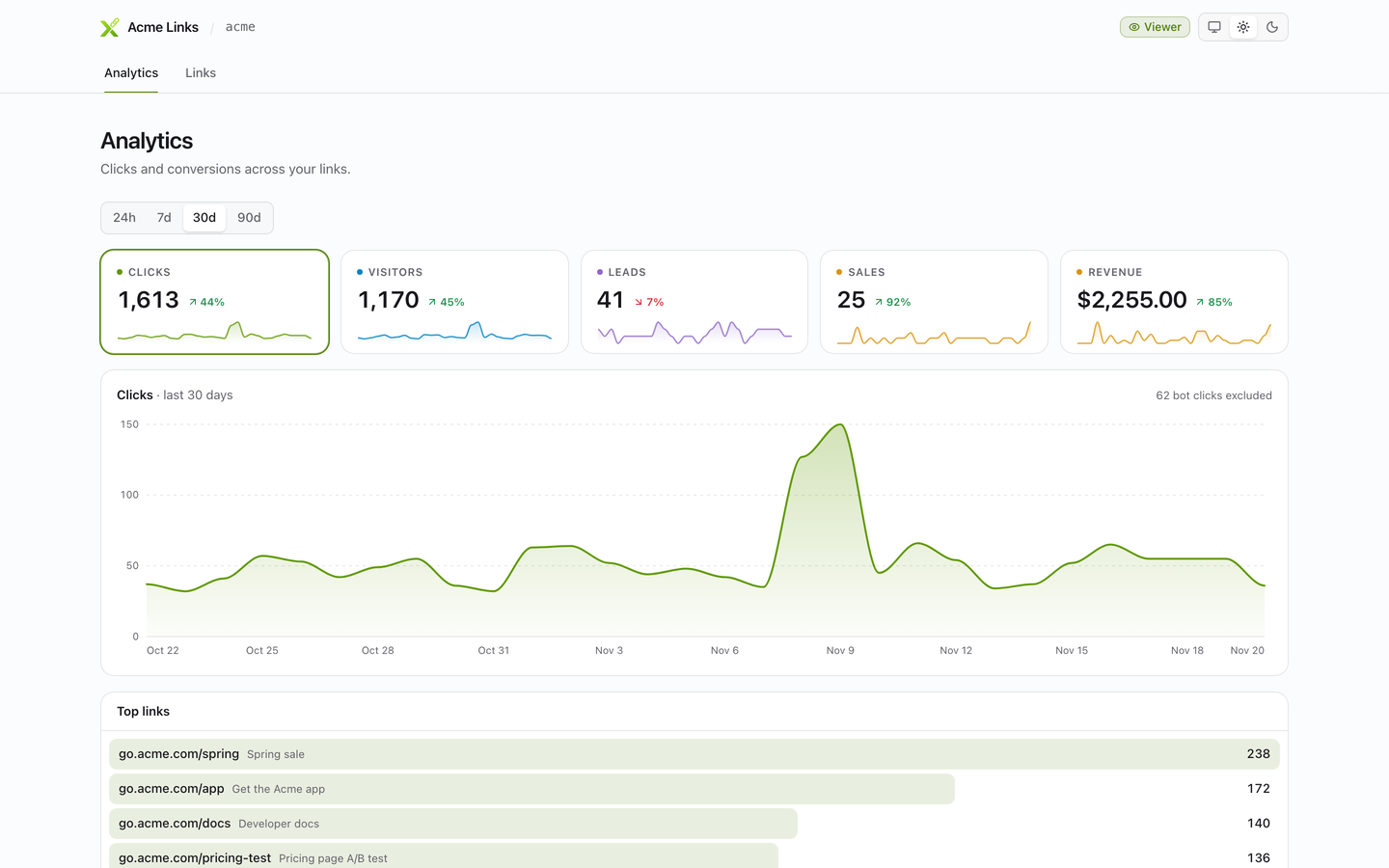
The widget is the admin SPA in viewer chrome: the navbar shows your title / logo, the token’s
tenant (no tenant switcher) and a “Viewer” badge, and only two tabs.
- Analytics (the landing view): the range picker (24h, 7d, 30d, 90d), KPI tiles for clicks,
visitors, leads, sales and revenue with the change against the previous period, the clicks
timeseries, and breakdowns (top links, countries, devices, referrers, …) that filter on click.
The same capability rules as the admin apply (UI):
no Visitors tile without
uniques, one filter at a time withoutcrossFilter, no recent-activity feed withoutevents. - Links (only when the token grants
link:read, which the default does): the tenant’s links, or only the token’slinks, with search, QR codes and each link’s detail and analytics. Withlink:createthe “New link” button appears; withlink:updatethe editor opens on existing links. Archiving, deleting and CSV export stay admin-only in the widget chrome, whatever the token grants.
Numbers always exclude bot clicks. A runnable host app with the widget is
examples/react-embed; the screenshot of it inside a host page is in
UI.