

Portal
The customer portal shows your customers their own plan, usage against limits, the plans they could move to, and links out to your billing provider’s checkout and billing portal — from inside your product. It is not a second API or a second UI: the same routes and the same SPA bundle, force-scoped by a signed token (ADR 0010). Invoices, payment methods and receipts stay with the provider (ADR 0015).
The flow
Section titled “The flow”sequenceDiagram participant U as Customer browser participant H as Your app server participant P as Entitlements panel U->>H: opens "Billing" page (your auth) H->>H: createPortalToken(secret, orgId) H-->>U: token U->>P: API calls with Authorization: Bearer entpt_… P->>P: verify + force-scope to that customer
1. Configure the panel
Section titled “1. Configure the panel”entitlementsPanel({ catalog, storage, counters, portal: { secret: process.env.PORTAL_SECRET! }, // any strong random string billing, // optional: createBilling(engine, { providers }) enables the link-outs});2. Mint tokens server-side
Section titled “2. Mint tokens server-side”import { createPortalToken } from "@xtandard/entitlements";
// In a route handler of YOUR app, after your own auth:app.get("/api/billing-portal-token", async (ctx) => { const org = await requireOrg(ctx); return { token: await createPortalToken(process.env.PORTAL_SECRET!, org.id) };});createPortalToken(secret, customer, { expiresIn, scope }):
expiresIndefaults to"1h"("15m","1d", milliseconds, …);scopedefaults to every portal action —["portal:read", "portal:checkout", "portal:manage"]. Pass["portal:read"]for a view-only portal (e.g. for non-owner members: no upgrade or manage-billing buttons).
The token is entpt_ + base64url({ customer, exp, scope }) + . + base64url(HMAC-SHA256);
verification (verifyPortalToken) is stateless, signature-first and constant-time.
3. Embed
Section titled “3. Embed”React (see UI for props):
import { CustomerPortal } from "@xtandard/entitlements/react/embed";
<CustomerPortal apiBaseUrl="/billing" token={token} />;
Or open the panel itself with the token: the SPA sends it as Authorization: Bearer on every API
call, /config answers mode: "portal" (with the customer and scope), and the UI renders the
reduced customer chrome.
Portal UI
Section titled “Portal UI”What the customer sees — the SPA in portal mode, or <CustomerPortal> — is one page:
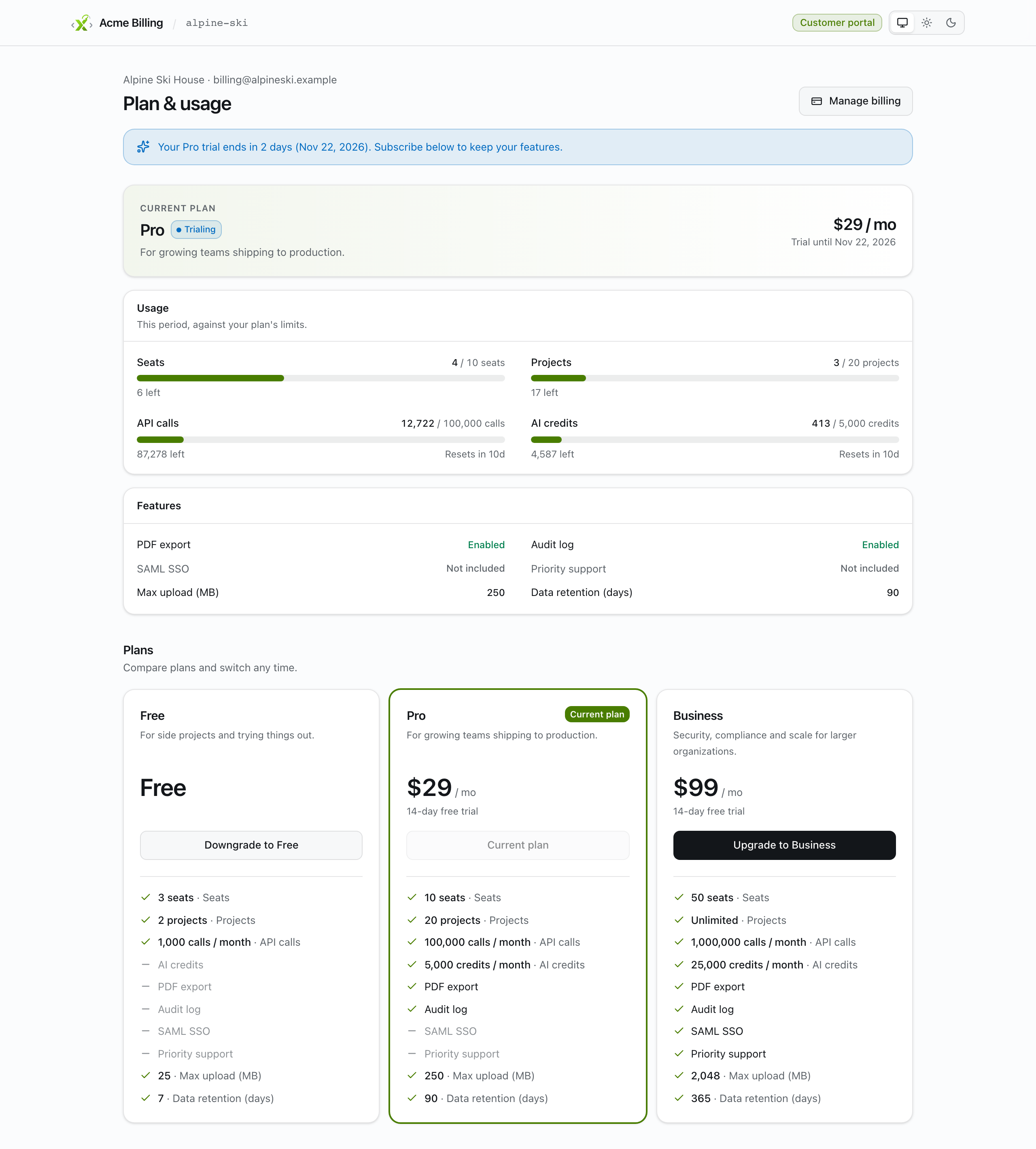
| Part | Shows |
|---|---|
| Header | your title / logoUrl, the customer id, a “Customer portal” badge, the theme switcher. No navigation. |
| Banners | a trial ending (“Your Pro trial ends in 2 days”), a failed payment (past_due, with Update payment when canManage), a scheduled cancellation (“ends on Dec 1”). |
| Current plan | plan name, status badge, display price, renewal / trial end, applied add-ons; Manage billing (POST /api/portal/manage → redirect) when canManage. |
| Usage | a meter per included metered / credits / capacity feature: used / limit, what is left, overage, “resets in” — coloured at 75 % and 90 %. |
| Features | the boolean and value features and whether / how they are included. |
| Plans | the public pricing table, current plan marked. Upgrade / Downgrade posts /api/portal/checkout with successUrl / cancelUrl = the current page and redirects to the returned url. Disabled, with a hint, when canCheckout is false (no provider, or a portal:read-only token). Choosing the free default plan opens Manage billing instead (leaving a paid plan is a cancellation). |
Getting the customer there without React: link to the panel with the token in the URL fragment, which never reaches servers or access logs —
const token = await createPortalToken(process.env.PORTAL_SECRET!, org.id, { expiresIn: "1h" });return Response.redirect(`${origin}/billing/#token=${token}`, 302); // `?token=` also worksThe SPA keeps the token in memory, removes it from the address bar, and renders the portal even
when the token is rejected (expired / tampered → the 401 message, never the admin chrome).
Admins open the same page for any customer from Open portal preview on the customer page
(/portal?customer=<id>), with a banner saying it is a preview.
For your own UI instead of the full page, @xtandard/entitlements/react reads the same
/api/portal/me with the same token: <UsageMeter>, <Gate>, <PricingTable>,
<UpgradePrompt> (UI).
The portal API
Section titled “The portal API”| Route | Action | Response |
|---|---|---|
GET /api/portal/me |
portal:read |
PortalView: entitlements + usage, profile, public pricing, link-out flags |
POST /api/portal/checkout |
portal:checkout |
{ url } — provider checkout for { plan, quantity?, successUrl?, cancelUrl? } |
POST /api/portal/manage |
portal:manage |
{ url } — provider billing portal for { returnUrl? } |
canCheckout / canManage in PortalView are true only when a billing provider supports the
link-out and the token’s scope allows it. Without billing, checkout / manage answer 404.
Scoping guarantees
Section titled “Scoping guarantees”- Only the token’s customer: the portal routes always act on it — a
?customer=parameter is ignored for portal principals. - Only the portal routes, and only the token’s scope: admin, runtime and out-of-scope portal routes
answer
403. - Expired / tampered / malformed tokens:
401 { code: "PORTAL_TOKEN" }, always — a presented-but-invalid portal token never falls back to host auth. - The host’s authorization provider is not consulted for portal principals (ADR 0010).
- Portal principals appear as
{ id: "portal:<customer>", metadata: { portal: true, customer } }(actortype: "portal").
Admin preview
Section titled “Admin preview”Admin principals can open any customer’s portal with ?customer=<id> — handy for support (“this
is what the customer sees”). Those calls go through your authorization provider with the portal
actions and { type: "portal", customer } (the admin role preset allows them; viewer does
not).
Operational notes
Section titled “Operational notes”- Tokens are bearer credentials: HTTPS only, keep
expiresInshort, mint fresh per page load rather than storing them. - Revocation before expiry = rotate
PORTAL_SECRET(invalidates every outstanding token). - The CLI / standalone image accept
PORTAL_SECRETas an env var.