 CasaTube
Self-hosted downloads that do not get lost
Paste a link, choose exactly the quality, audio tracks and subtitles that video has, and close the tab. The queue lives on the server, survives restarts, and drops the file into your media library named and tagged the way Jellyfin and Plex expect.

The browser only watches
Most self-hosted downloaders run the download inside your browser session, or forget it when the container restarts. CasaTube is built around one requirement: a job survives the browser closing and the service restarting.
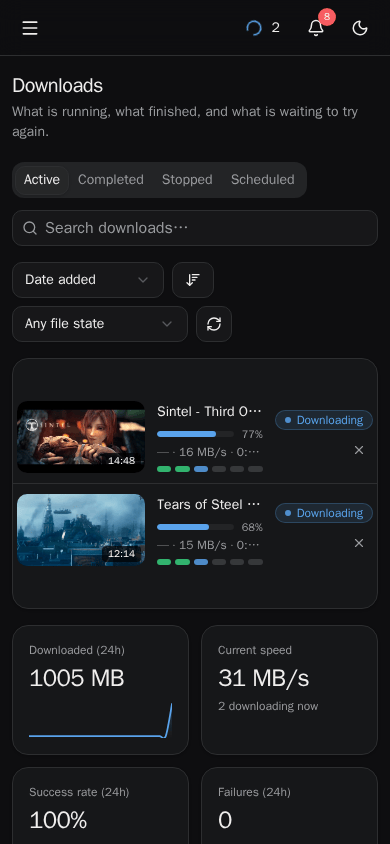
Close the tab, lock the iPad, redeploy halfway through a film. The job carries on — or goes back to the queue and resumes — and every stage it passes through is on screen, live, with its own log for when something fails at 3 a.m.

What it does
Built for one household and its media server, and careful about the details that make a library pleasant to use months later.
Choose before you download
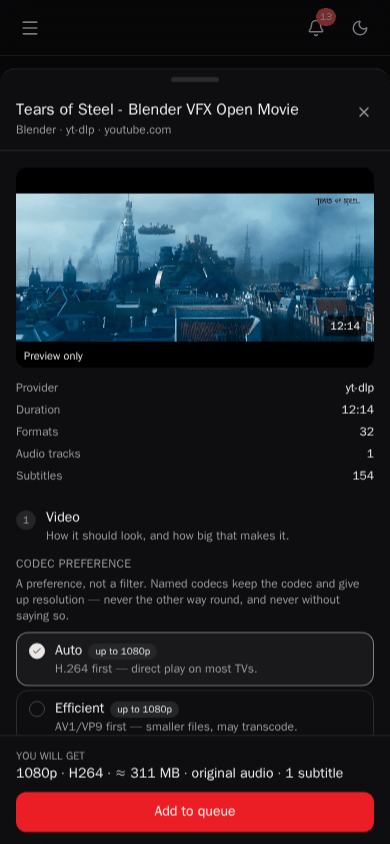
The resolutions, codecs, audio tracks and subtitles that video actually has — with sizes — not a generic list that silently falls back to something else.
Correct language tags
Audio and subtitle languages are chosen independently and written into the file properly, so your media server shows the right names.
Never overwrites
Name the file yourself. A name that is taken is reported before anything is queued, and subtitles and thumbnails always follow the final name.
A library with a player
Browse downloads with thumbnails, play them in the browser with real seeking, switch audio and subtitles, download a bundle, or move things to a trash you can restore from.
Subscriptions
Follow channels and playlists. New uploads are queued on a schedule, without re-downloading the back catalogue.
Beyond yt-dlp
Everything yt-dlp supports, plus private Telegram channels through your own session and Google Drive files without the shared API key yt-dlp depends on.
Plugins in TypeScript
Written in an in-app editor and loaded without a restart: rewrite links, call a webhook, ask Jellyfin to scan when a file lands.
Credentials, sealed
Cookies, passwords, API keys and sessions for sites that need a login, encrypted at rest when you set a key — and never sent back to the browser.
One image, no host setup
The app, yt-dlp and ffmpeg in one container for amd64 and arm64. Runs on plain Docker, Compose or CasaOS, from a phone-friendly UI in light and dark.
A closer look
Screenshots from a fresh instance, downloading Blender Studio's open movies.


Install
One image with everything inside. Pick how you run containers; docs/DEPLOY.md has every setting.
Docker Compose
Downloads land in ./library; settings go in a .env beside the file.
mkdir casatube && cd casatube
curl -fsSLO https://raw.githubusercontent.com/\
xantiagoma/casatube/main/docker-compose.yml
docker compose up -d
Docker
Point /library at the folder your media server reads.
docker run -d --name casatube \
  --restart unless-stopped \
  -p 8520:8520 \
  -e PUID=1000 -e PGID=1000 \
  -v ./data:/data \
  -v /mnt/media/videos:/library \
  ghcr.io/xantiagoma/casatube:latest
CasaOS
App Store → Custom Install → Import, then paste docker-compose.casaos.yml and adjust the two folders.
http://<your-server>:8520
Images
ghcr.io/xantiagoma/casatube, for amd64 and arm64. yt-dlp is the part that rots — sites change and it follows them — so releases are rebuilt every week with the newest one.
| Tag | What it is |
|---|---|
latest | The newest release, with the newest yt-dlp. Rebuilt weekly. |
0.1, 0.1.0 | That release, with the newest yt-dlp. Rebuilt weekly. |
0.1.0-ytdlp-2026.08.19 | Exactly that app and that yt-dlp. Never changes — pin this to update on purpose. |
main, sha-abc1234 | The tip of the main branch, and one exact commit of it. Not releases. |
Put it behind something
CasaTube has no login of its own. It is built for a private network, and anyone who can reach the port can use it — including the plugin editor, which runs code on the server by design. Reach it over Tailscale, through Cloudflare Access, or behind a reverse proxy that authenticates — docs/SECURING.md has the configurations.
Set CREDENTIALS_KEY before storing a cookie, a password or a Telegram session; without it they are kept in plain text, and the app says so.
Use it responsibly
- Your downloads are your responsibility. Use CasaTube only for media you have the right to download and keep: your own uploads, public-domain or openly licensed works, and content whose owner or platform terms allow it. Copyright law and site terms differ by country and by site, and many platforms forbid downloading outside their own features.
- No DRM circumvention. CasaTube does not decrypt or bypass DRM or other technical protection measures, and will not.
- As is, no commitments. A personal, non-commercial project, provided without warranty under the MIT licence, with no support agreement or SLA.
- Not affiliated. CasaTube is not a YouTube product and has no connection to YouTube, Google, Dailymotion, Vimeo, Telegram, Jellyfin, Plex, CasaOS or any other service named here; their names are trademarks of their owners, used only to describe compatibility.
The full disclaimer and the NOTICE — including the GPL software in the image — are in the repository.